Tags are a way of grouping together blocks or items. This is a great way of maintaining mod compatibility between mods without the mods knowing about each other.
For example they allow you to use a tag of minecraft:ingots/copper in your recipe instead of having to manually make a recipe for each copper ingot that you can think of. Then every item added into the minecraft:ingots/copper tag will be usable in that recipe.
Tags are stored in src/main/resources/data/<namespace>/stationapi/tags, then they are divided into the blocks folder and the items folder.
Keep in mind that block and item tags are separate. You can't add blocks to an item tag or vice versa. For recipes, item tags is what is used so don't forget to add your block's block item into the appropriate tag.
When adding tags you need to create a JSON file depending on the path you want your tag at, for example if you wanted to add a log to the minecraft:logs tag, you would create a file src/main/resources/data/minecraft/stationapi/tags/blocks/logs.json and in that file you would specify the logs that you want to add in a JSON array with the key of values, like this:
src/main/resources/data/minecraft/stationapi/tags/blocks/logs.json
{
  "values": [
    "examplemod:example_log"
  ]
}
Now the block with the ID of examplemod:example_log will be added to the minecraft:logs tag.
You can verify that your block tag has applied correctly by opening the debug menu and hovering over the block.
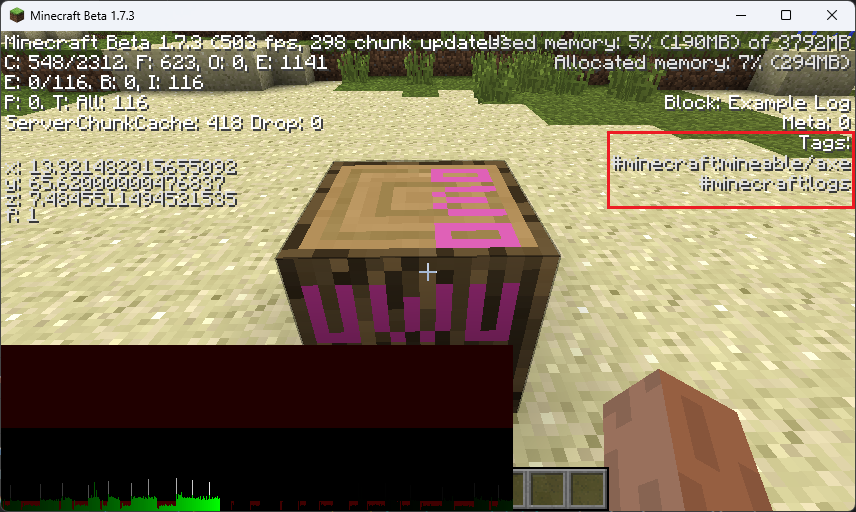
You are not limited to adding blocks into your tags, you can also add more tags by prefixing them with an #, so to add a tag like examplemod:logs/example you would add #examplemod:logs/example as an value into the tag JSON.
When you create a tag in the same path as an already existing one, it will be added additively to the existing tag. This means that you are not overwriting the tag but adding to it.
If you want to change this behavior, you can add a "replace": false key before the values key. This will remove the values added by all mods with lower resource loading priority than yours. This not recommended unless there is a really good reason for it.
External Resources
Minecraft Wiki Tags - StationAPI uses resource loading very similar to modern, this tutorial is therefore mostly applicable, except for the list of tags.